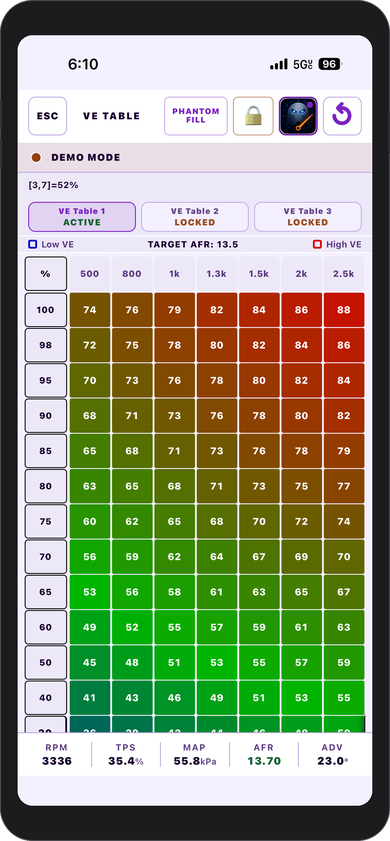
VE table editing
Read, edit, temporarily write, burn, and verify the primary VE table with live operating data and cell-level controls.
GhostTune brings full VE, ignition, and AFR table editing, live data, and guarded ECU writes to iPhone and iPad. An independent app, verified on MicroSquirt® hardware running MS2/Extra 3.4.4.
GhostTune iOS price: $35 USD. Production validation is complete · GhostTune v1.0 is now available on the App Store · Local WiFi is required for live ECU communication
GhostBridge is the Crux Resolve WiFi-to-RS232 bridge designed and verified for the published GhostTune + MicroSquirt / MS2/Extra 3.4.4 workflow. It creates the direct local WiFi link without a router or cloud service.
iPhone / iPad → local WiFi → GhostBridge GB-01 → MicroSquirt
A short look at the GhostTune workflow, from launch and live data to table editing and built-in guidance.
The Reel opens on Facebook only after you choose to watch, keeping this page lightweight.
Actual GhostTune screens covering setup, live monitoring, and ECU configuration.
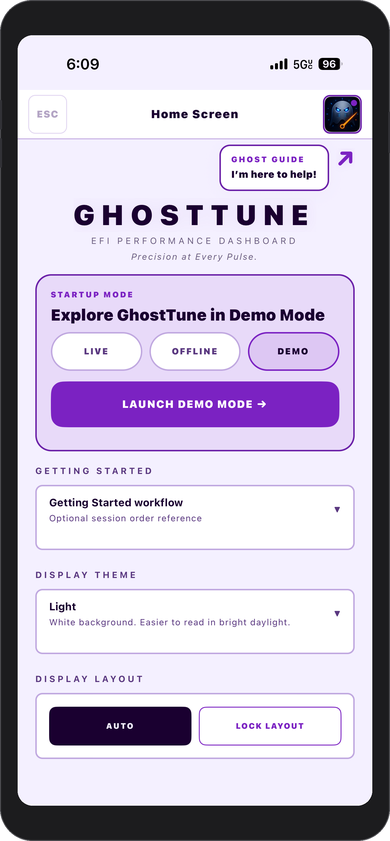
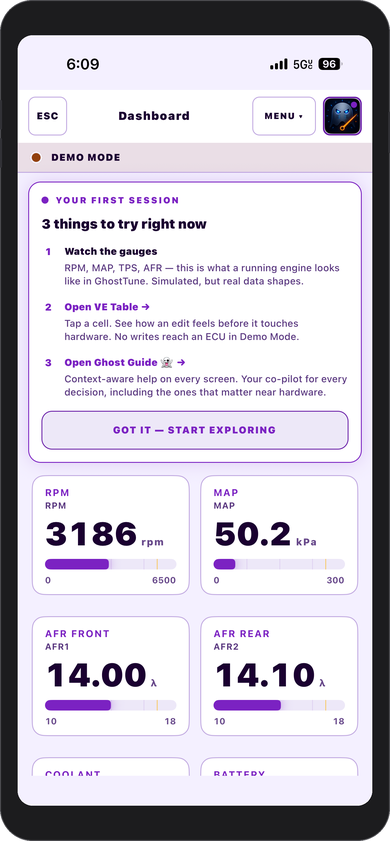
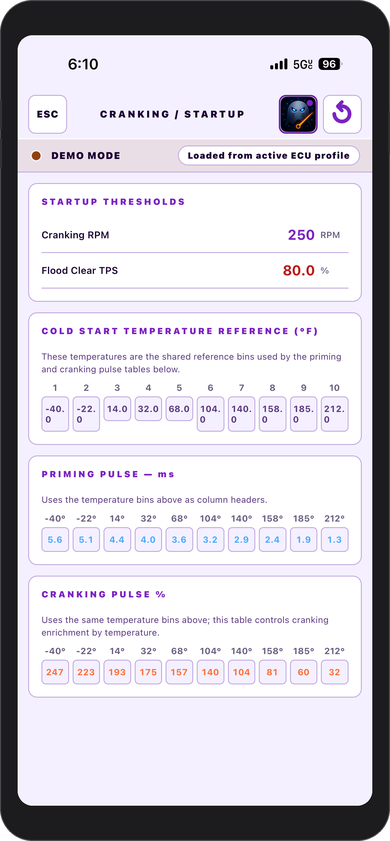
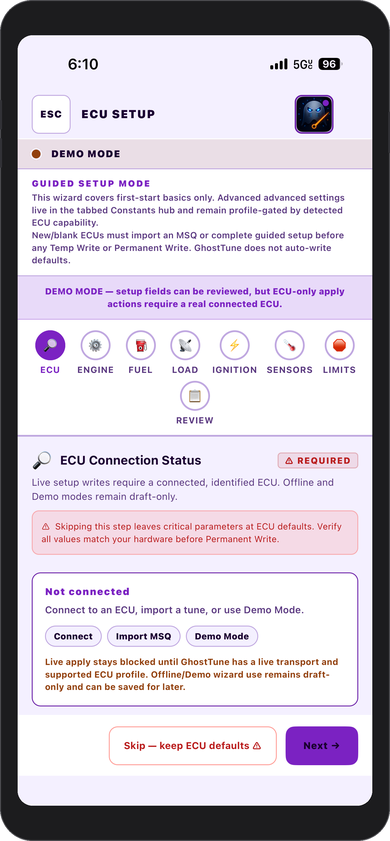
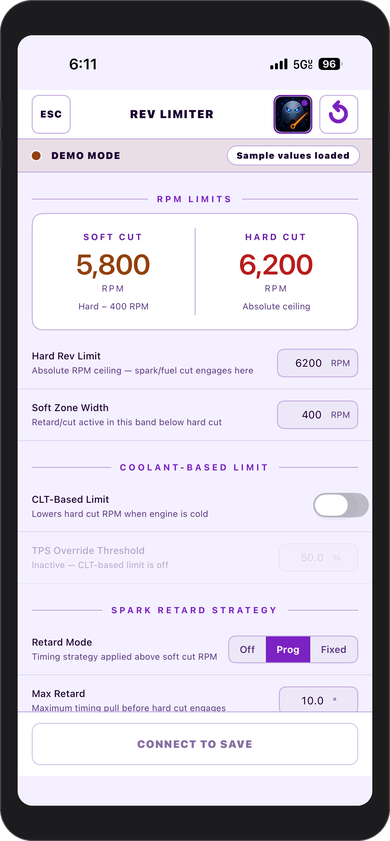
Android development now includes Bluetooth Classic SPP, BLE UART, WiFi, and USB-C OTG serial connectivity. These connections are in beta testing; the USB OTG implementation is a read-only pilot and a public Android release has not been announced.
Looking for an Android MicroSquirt / MS2/Extra tuning app? See the current beta transport and compatibility details before choosing an adapter.
Every screen is designed around a real tuning workflow rather than a desktop interface compressed onto a phone.
Read, edit, temporarily write, burn, and verify the primary VE table with live operating data and cell-level controls.
Edit supported ignition and AFR target tables using profile-defined addresses, scales, and guarded write paths.
Monitor RPM, TPS, MAP, coolant temperature, AFR, intake temperature, battery voltage, and ignition advance.
Purpose-built screens for cranking, priming, after-start enrichment, warm-up, sensor calibration, idle, and related setup.
Save, compare, export, and restore supported tune data while keeping a known-good backup available.
Contextual in-app guidance explains screens, parameters, safety considerations, and common tuning concepts.
Inspect connection health and communication behavior before relying on the link for ECU changes.
Explore the complete interface with simulated data before connecting to live hardware.
Writes use coordinated polling pauses, response validation, burn sequencing, re-reading, and verification with interruption handling.
GhostTune communicates with the ECU through a WiFi-to-RS232 bridge. There is no cloud relay and no cable attached to the iPhone or iPad.
Attach a compatible bridge to the ECU diagnostic serial port and provide the bridge with power.
Connect the iPhone or iPad to the bridge’s local access point in device settings.
GhostTune identifies the ECU profile and keeps unsupported write paths blocked.
Back up the tune, make supported changes, and use the guarded temporary-write or permanent-burn workflow.
GhostBridge v1.0 (GB-01) is the Crux Resolve WiFi-to-RS232 bridge designed and verified for the published GhostTune + MicroSquirt workflow. It creates the local WiFi connection GhostTune uses without requiring a router or cloud service.
GhostTune does not apply one ECU’s addresses, scales, or write behavior to another platform.
| ECU / firmware | Status | Notes |
|---|---|---|
| MicroSquirt hardware · MS2/Extra 3.4.4 firmware | Verified | Production validation completed for communication, reads, guarded writes, burns, alerts, restoration, protocol handling, and recovery workflows. |
| Other ECU platforms or firmware versions | Not supported | Remain blocked until profile constants, communication, writes, burns, and safety behavior are independently verified. |
Yes. GhostTune is built for iPhone and iPad and the current release is production-validated with MicroSquirt hardware running MS2/Extra 3.4.4. Live ECU communication uses a compatible local WiFi-to-RS232 bridge.
Yes. GhostTune provides its tuning interface directly on iPhone and iPad. For the verified live setup, the Apple device connects over local WiFi to a compatible RS232 bridge attached to the ECU.
The released iPhone and iPad app uses a verified local WiFi-to-RS232 bridge. GhostTune for Android is in beta testing with Bluetooth Classic SPP, BLE UART, and USB-C OTG serial paths; these Android combinations are not yet production-verified. Read about the Android beta.
The current release is verified with MicroSquirt hardware running MS2/Extra 3.4.4 firmware. Only configurations explicitly listed by Crux Resolve should be treated as supported.
GhostTune checks the result of supported ECU changes and reports an interruption or mismatch instead of presenting the operation as successful. A known-good backup remains essential because no software can eliminate every power, wiring, hardware, or firmware risk.
Yes. Demo Mode lets you explore the interface and simulated live data before connecting to an ECU.
No. ECU communication, tune files, and engine data remain on your device and local WiFi connection unless you deliberately export or share a file.
Not in the current release unless a configuration is explicitly listed on the GhostTune compatibility information. The current verified configuration is MicroSquirt hardware running MS2/Extra 3.4.4.
GhostBridge v1.0 (GB-01) is the Crux Resolve hardware designed and verified for the published workflow. Another WiFi-to-RS232 bridge must still meet the communication requirements of the supported configuration.
GhostTune Android is in beta testing, not publicly released through Google Play. Bluetooth SPP, BLE UART, WiFi, and USB OTG are being evaluated. USB OTG uses a read-only pilot; see Android features, compatibility and updates.
GhostTune is available for iPhone and iPad for the verified MicroSquirt and MS2/Extra 3.4.4 configuration. GhostTune is priced at $35 USD on the App Store. Follow the App Store for the final charge. Use the optional form below for product updates, new demos, and customer-use tips. Formspree processes the form as explained in the Privacy Policy.
Choose the product that fits your job, or email Crux Resolve directly if you want a compatibility check, setup help, or a recommendation before ordering.