How to Connect MicroSquirt to WiFi With an RS232 Bridge
A MicroSquirt does not need built-in WiFi to communicate wirelessly with an iPhone or iPad. A compatible RS232-to-WiFi bridge can sit between the ECU and the mobile device, allowing supported tuning software to communicate over a private local network instead of a cable.
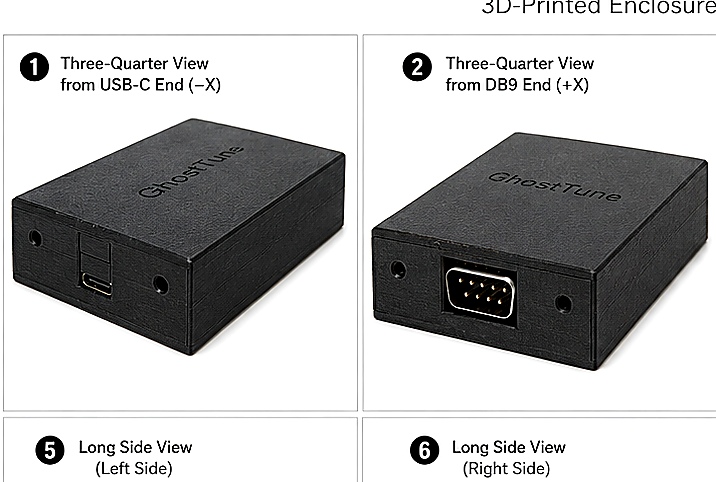
What the WiFi Bridge Actually Does
The bridge replaces the physical cable between the tuning device and the ECU's serial connection. The MicroSquirt continues using its normal serial interface; the bridge makes that connection available over local WiFi.
The basic path is:
The bridge is not a replacement ECU and does not change the calibration by itself. It provides the communication path. The tuning application on the phone or tablet is what displays live ECU information and, when supported, allows calibration work.
What You Need
- A MicroSquirt ECU with a supported firmware configuration.
- A compatible RS232 connection and cable.
- An RS232-to-WiFi bridge that matches the electrical and connection requirements of the setup.
- An iPhone or iPad with compatible tuning software.
- Stable power for the ECU and bridge.
For the current Crux Resolve setup, GhostBridge GB-01 provides the wireless RS232 connection and GhostTune provides the iPhone/iPad tuning application. The published verified ECU configuration is MicroSquirt hardware running MS2/Extra 3.4.4.
Step-by-Step: Connecting MicroSquirt to WiFi
1. Connect the RS232 bridge to the MicroSquirt
Start with the ECU powered off. Connect the bridge using the correct serial cable and pinout for the installation. A DB9 connector by itself does not guarantee compatibility, so use wiring intended for the specific ECU and bridge combination.
With GhostBridge GB-01, the DB9 side is the RS232 connection and USB-C is used to power the bridge.
2. Power the ECU and bridge
Apply normal power to the MicroSquirt and power the bridge. A wireless connection can only be reliable when both devices have stable power. If the bridge repeatedly disappears from the phone's WiFi list, check power before troubleshooting software.
3. Join the bridge's WiFi network
For GhostBridge GB-01, open WiFi settings on the iPhone or iPad and select the network named GhostBridge-XXXXX. The final characters identify the individual bridge.
The password is 1234 followed by the final four characters shown in that GhostBridge network name. For example, if the network is GhostBridge-ABCDE, the password is 1234BCDE.
This is a local connection between the mobile device and the bridge. Internet access is not required for live ECU communication.
4. Open the tuning application
Once the phone is connected to the bridge's WiFi network, open the supported tuning application. In the GhostTune and GhostBridge setup, the bridge's local connection is available at 192.168.4.1:35000.
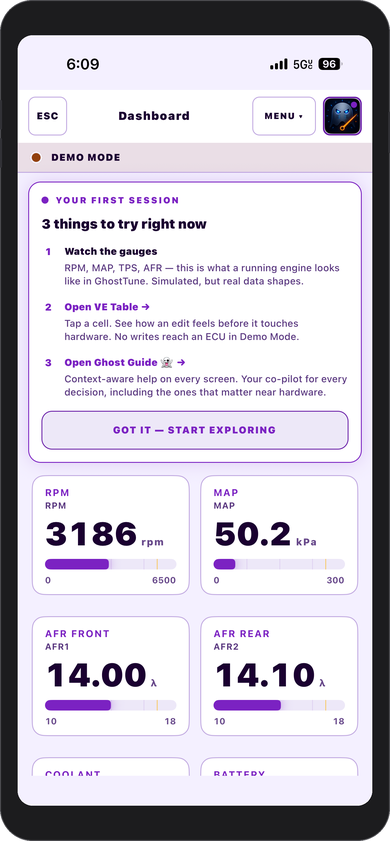
GhostTune is designed to use this local connection with the verified MicroSquirt configuration. If the connection succeeds, live ECU values should begin responding to the running engine and sensor inputs.
How to Confirm the Connection Is Working
Seeing the WiFi network is only the first step. The most useful confirmation is live ECU data that behaves normally.
Check values that should be easy to recognize. With the engine running, RPM should respond correctly. TPS should move with throttle position. MAP should respond to engine load and vacuum. Temperatures and battery voltage should also be believable for the vehicle's condition.
If those values update normally, the complete communication path is working rather than just the WiFi portion.
WiFi Connected but No ECU Data?
If the phone joins the bridge network but the tuning application cannot communicate with the ECU, work from the physical connection outward:
- Confirm the MicroSquirt is powered. The bridge can create a WiFi network even if the ECU itself is not communicating.
- Check the RS232 connection. Make sure the correct cable, connector orientation, and wiring are being used.
- Confirm the phone is still connected to the bridge WiFi. Mobile devices may try to move back to another known network.
- Verify the supported ECU configuration. A working WiFi connection does not make an unsupported ECU or firmware automatically compatible with the tuning application.
- Restart the connection cleanly. Power the ECU and bridge normally, reconnect the phone to the bridge WiFi, then reopen the tuning application.
Why Use a Local WiFi Network?
A dedicated local network keeps the communication path simple. The vehicle does not need to be near a home router, shop network, or internet connection. This can be useful in a garage, driveway, trailer, dyno area, or anywhere else the vehicle is being serviced.
The tradeoff is that the iPhone or iPad may not have normal internet access while it is connected to the bridge's WiFi network. That does not prevent the local ECU connection from working.
Will Any RS232-to-WiFi Bridge Work?
Not automatically. Products that all advertise “RS232 to WiFi” can differ in wiring, electrical behavior, serial settings, network behavior, power requirements, and how they handle the connection.
For that reason, compatibility should be based on the complete setup rather than the connector name alone. GhostBridge GB-01 is the Crux Resolve bridge specifically published for the current GhostTune and MicroSquirt workflow.
Can You Use WiFi Without GhostTune?
A transparent RS232-to-WiFi bridge may be usable with other software when that software supports the same connection method and the complete serial requirements match. That is separate from saying a particular combination has been tested or supported.
For Crux Resolve products, the current published verified combination is GhostTune with GhostBridge GB-01 and MicroSquirt hardware running MS2/Extra 3.4.4.
Where to Go Next
If your goal is full mobile tuning rather than only establishing the wireless link, the next step is understanding what the tuning application can do once connected. The broader MicroSquirt from iPhone setup guide covers the complete wireless workflow, while the wireless serial bridging guide explains the communication concept in more detail.