How to Tune a MicroSquirt From an iPhone: A Practical Wireless Setup Guide
A supported MicroSquirt can be tuned from an iPhone or iPad by placing a compatible RS232-to-WiFi bridge between the ECU and the mobile device. The ECU keeps using its normal serial connection while the phone communicates over a private local WiFi network.
What you need
- A MicroSquirt ECU running a configuration explicitly supported by the tuning application.
- A compatible RS232 connection and cable.
- A local RS232-to-WiFi bridge.
- An iPhone or iPad with compatible tuning software.
- Stable power for the ECU and wireless bridge.
- A known-good tune backup before making meaningful changes.
How the wireless connection works
The WiFi bridge does not replace the ECU. It provides the wireless path between the mobile device and the ECU's serial connection. Internet access is not required for the live ECU connection.
Current GhostTune and MicroSquirt compatibility
The current GhostTune release is verified with MicroSquirt hardware running MS2/Extra 3.4.4. A WiFi network appearing on the phone does not by itself mean another ECU or firmware version is supported.
For the latest supported configuration, use the GhostTune compatibility guide and the current GhostTune product page.
Step 1: Connect and power the wireless bridge
With the vehicle in a safe working condition, connect the RS232 bridge using the correct cable and pinout for the supported setup. Power the ECU normally and power the bridge according to its product requirements.
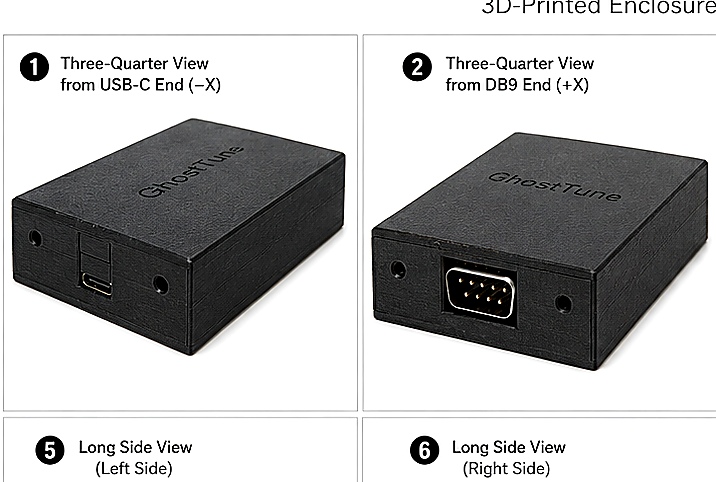
For GhostBridge GB-01, the DB9 connector is the RS232 interface and USB-C provides power.
Step 2: Join the local WiFi network
For GhostBridge GB-01, open WiFi settings on the iPhone or iPad and select the network named GhostBridge-XXXXX. The password is 1234 followed by the final four characters of that WiFi name. For example, GhostBridge-ABCDE uses 1234BCDE.
The phone may report that the network has no internet connection. That is normal for a dedicated local ECU connection.
Step 3: Open GhostTune and confirm live data
GhostBridge GB-01 provides the local connection at 192.168.4.1:35000. Once GhostTune is connected to the supported ECU, confirm that live values respond normally before changing anything.
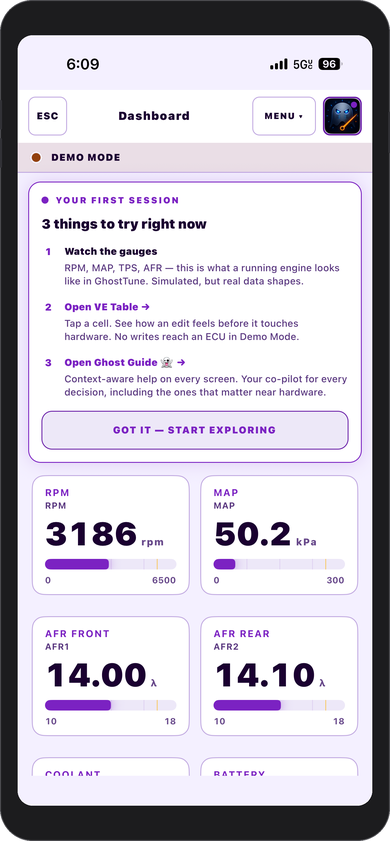
Useful checks include RPM, TPS, MAP, AFR, coolant temperature, and battery voltage. Values should be believable for the vehicle's current state and should respond when the engine or controls change.
Step 4: Save a known-good tune
Before making meaningful calibration changes, save a known-good copy of the current tune. A backup gives you a reference point if a later adjustment produces an unexpected result.
Step 5: Make supported calibration changes
GhostTune provides VE, ignition, and AFR target table editing along with live ECU information and other supported tuning controls. Make changes deliberately and in a safe environment.
Temporary changes and permanent storage are separate actions. A temporary write can be evaluated during the current ECU power session; a permanent burn is used when the supported change is intended to remain after a power cycle.
Step 6: Confirm the result
After a supported ECU change, GhostTune checks the affected information again before reporting the operation as complete. If a mismatch or interruption is detected, treat the ECU state as unresolved until communication is restored and the relevant values are confirmed.
What if the phone connects to WiFi but GhostTune shows no ECU data?
A working WiFi connection only proves that the phone can see the bridge. It does not prove that the ECU side of the connection is working.
Check ECU power, bridge power, the RS232 cable and connector, the selected WiFi network, and the supported ECU/firmware configuration. The dedicated MicroSquirt WiFi troubleshooting guide walks through those checks in order.
WiFi or Bluetooth?
Either wireless method can be useful when the mobile software and adapter support the same connection type. GhostTune's current live ECU workflow uses local WiFi through a compatible WiFi-to-RS232 bridge. See the MicroSquirt WiFi vs Bluetooth guide for a practical comparison.
Do you need internet access?
No. The live ECU connection can remain entirely local between the phone, bridge, and ECU. Internet access is only needed for things such as downloading the app, opening online documentation, or intentionally sharing files.
Safety reminders
- Work only with a configuration explicitly supported by the tuning application.
- Keep a known-good tune backup.
- Confirm live values are believable before changing calibration.
- Do not tune a running vehicle in an unsafe environment.
- Resolve connection interruptions or reported mismatches before continuing.