Can GhostTune Tune MicroSquirt? Current Compatibility and Requirements
Yes. GhostTune is currently available for iPhone and iPad and the published verified ECU configuration is MicroSquirt hardware running MS2/Extra 3.4.4. Live communication uses a compatible local WiFi-to-RS232 bridge, with GhostBridge GB-01 being the Crux Resolve hardware designed and verified for this setup.
Current Verified GhostTune Setup
Why the Exact MicroSquirt Software Version Matters
ECU tuning software must know exactly how the connected ECU represents its settings and live information. Two units that look physically identical can still require different software support if their ECU software versions differ.
For that reason, the current GhostTune compatibility statement is intentionally specific: MicroSquirt hardware running MS2/Extra 3.4.4.
If your MicroSquirt reports a different version, confirm compatibility before making ECU changes.
Does GhostTune Work on iPhone and iPad?
Yes. GhostTune is designed for iPhone and iPad. For live ECU communication, the Apple device joins the local WiFi network created by a compatible RS232 bridge attached to the MicroSquirt.
The live ECU connection itself does not require internet access.
Do You Have to Use GhostBridge?
GhostBridge GB-01 is the Crux Resolve WiFi-to-RS232 bridge designed and verified for the current GhostTune workflow.
GhostTune is not presented as being locked to a product name alone, but another bridge still has to match the complete communication requirements of the supported setup. A generic RS232-to-WiFi label does not guarantee that a particular bridge will work correctly.
If you want the published Crux Resolve hardware combination, GhostBridge GB-01 is the straightforward choice.
What Does the Wireless Connection Replace?
The wireless bridge replaces the cable between the mobile tuning device and the ECU's serial connection. The MicroSquirt continues communicating through its normal serial interface.
This is why having a working WiFi connection is not the same thing as having confirmed ECU compatibility. The phone still needs the correct application support for the connected ECU.
How Do I Check My Setup Before Connecting?
- Confirm the ECU is a MicroSquirt.
- Confirm it is running MS2/Extra 3.4.4 for the currently published GhostTune configuration.
- Use a compatible RS232 connection and cable.
- Use a compatible local WiFi-to-RS232 bridge.
- Install the current GhostTune release from the App Store.
- After connecting, confirm live values update normally before making changes.
What Live Values Should You Check First?
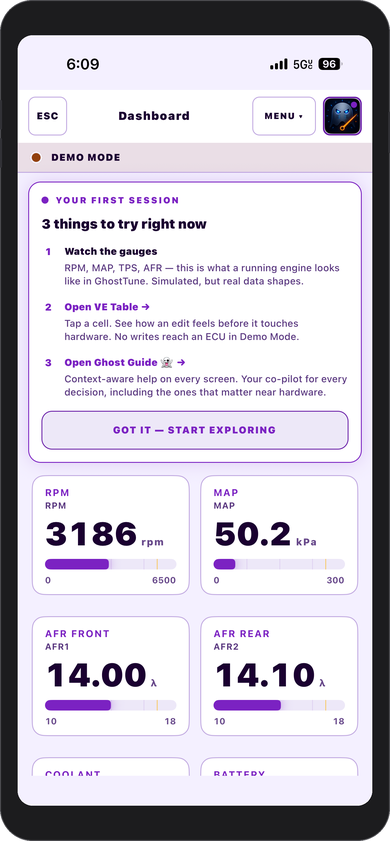
Once connected, use values that are easy to compare with what the vehicle is actually doing. RPM should respond to engine speed, TPS should follow throttle position, MAP should react to engine vacuum and load, and temperature and battery-voltage readings should be plausible.
If values are obviously wrong or frozen, resolve the connection or compatibility issue before making tuning changes.
Can I Explore GhostTune Without Connecting to a MicroSquirt?
Yes. GhostTune includes Demo Mode so the interface can be explored without a live ECU connection. This is useful for seeing the app before connecting it to a vehicle.
Does GhostTune Send Tune Data to the Cloud?
No. ECU communication and tune data stay on the device and local WiFi connection unless you deliberately export or share a file.
What If My ECU Is Not the Verified Configuration?
Do not assume that a similar connector, product family, or ECU name means the setup is compatible. Check the current GhostTune product page or contact support@cruxresolve.com before attempting live tuning with an unlisted configuration.
Keeping compatibility statements narrow protects the user from treating an unverified combination as equivalent to the published setup.
Frequently Asked Questions
What MicroSquirt version works with GhostTune?
The current published verified setup is MicroSquirt hardware running MS2/Extra 3.4.4.
Does GhostTune work on iPad?
Yes. GhostTune supports iPhone and iPad.
Does GhostTune use WiFi or Bluetooth?
The current live ECU connection uses local WiFi through a compatible WiFi-to-RS232 bridge.
Does live tuning require internet access?
No. The phone or tablet communicates with the bridge over a local WiFi network.
Where can I get GhostTune?
GhostTune v1.0 is available on the Apple App Store from the GhostTune product page.