Can You Tune a Car From Your Phone? What Mobile ECU Tuning Can—and Can’t—Do
Yes, a phone or tablet can be a real ECU tuning tool—but only when the ECU, communication hardware, and tuning software are all compatible. The phone is the interface. It does not magically make every factory or aftermarket ECU tunable.
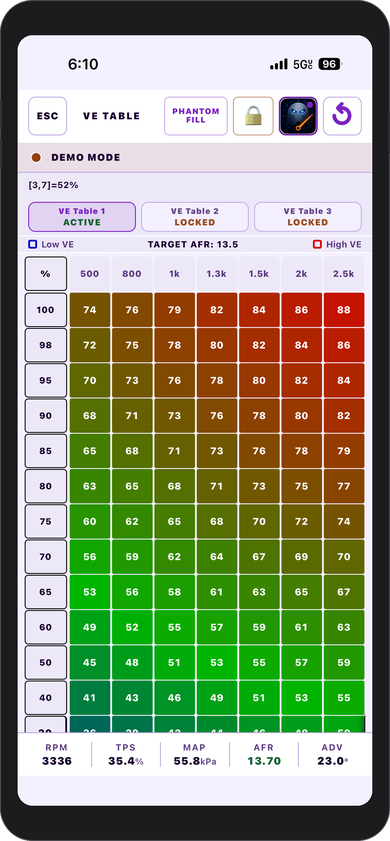
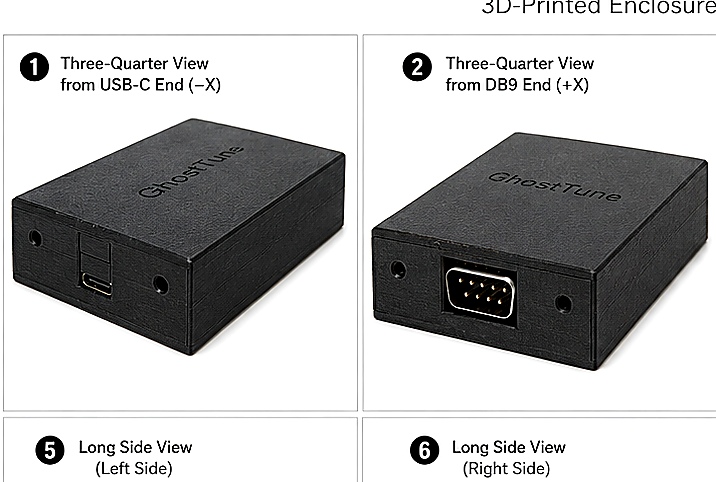
What “tuning from your phone” actually means
There are several very different things marketed as phone-based vehicle tuning. Some apps only display gauges. Some read diagnostic trouble codes. Some change a small set of predefined settings. A true ECU tuning application goes further by reading calibration data, editing supported parameters or tables, writing changes back to the ECU, and confirming the result.
That distinction matters. Seeing RPM and coolant temperature on a phone does not prove that the same app can safely edit fuel or ignition calibration.
The four pieces that have to work together
If any one of those four pieces is wrong, the system may fail completely—or worse, appear to connect while still being unsafe for calibration changes.
What a capable mobile tuning app can do
Real tuning functions
- Display live engine and sensor data.
- Read calibration tables and settings.
- Edit fuel, ignition, AFR targets, and other supported parameters.
- Save and restore tune data.
- Temporarily write changes for testing when the ECU supports that workflow.
- Burn verified changes to nonvolatile memory.
- Run connection and compatibility checks before enabling writes.
What the phone does not solve
- It does not make an unsupported ECU compatible.
- It does not correct a wrong cable or pinout.
- It does not turn a diagnostic-only adapter into a tuning interface.
- It does not eliminate the need for safe calibration practices.
- It does not guarantee that two vehicles need the same tune.
- It does not remove the value of a laptop for some advanced workflows.
Why compatibility matters more than screen size
The difficult part of ECU tuning is not drawing a fuel table on a small screen. The difficult part is knowing exactly how a particular ECU expects data to be read, scaled, written, stored, and verified.
Different ECU families can use different protocols, page layouts, addresses, data sizes, checksums, write commands, burn procedures, and recovery behavior. Even two ECUs with similar connectors may be completely different internally.
That is why a responsible mobile tuning app should identify supported configurations explicitly instead of implying that a generic wireless connection can tune everything.
Can an iPhone tune an aftermarket ECU?
Yes, when an iPhone-compatible application supports that ECU and there is a compatible connection path. For example, the current GhostTune release is built for iPhone and iPad and is production-verified with MicroSquirt hardware running MS2/Extra 3.4.4.
In that verified setup, the ECU's RS232 connection is placed on a private local WiFi network through a compatible bridge. GhostTune then provides live data, VE/ignition/AFR table editing, tune-file tools, diagnostics, and guarded ECU changes directly on the Apple device.
Does mobile tuning require internet access?
Not necessarily. A well-designed local setup can communicate directly between the phone and the ECU interface without using the internet or a cloud server.
GhostTune's verified live workflow uses a local WiFi connection. GhostBridge creates its own access point, so the iPhone or iPad can communicate with the ECU without a router or internet connection.
WiFi, Bluetooth, or a cable?
All three can work, but they are not interchangeable. The tuning app has to support the transport being used, and the adapter still has to match the ECU's electrical and communication requirements.
WiFi can provide a direct TCP connection and broad device compatibility. Bluetooth can be convenient when both the operating system and tuning software support the required profile. A cable can remove the wireless layer entirely but may be less convenient in a vehicle. The best option is the one the complete supported system was designed and tested around.
Is a phone enough for serious tuning?
For many real-world tasks, yes. A good mobile interface can be especially useful for making a controlled adjustment, checking live data from the driver's seat, reviewing a table in the garage, or working on a vehicle where carrying a laptop is inconvenient.
A laptop can still be preferable for very large calibration projects, extensive log analysis, firmware development, advanced configuration tools, or software that simply does not exist on mobile. Mobile tuning does not have to replace every desktop workflow to be useful.
What should you check before trying mobile ECU tuning?
- Identify the exact ECU and firmware. Do not rely only on the connector or product family name.
- Confirm the app explicitly supports it. Similar does not mean compatible.
- Confirm the physical interface. RS232, CAN, USB, K-Line, and other transports have different requirements.
- Use the correct cable and pinout. A connector that fits can still be electrically wrong.
- Establish a stable connection before writing. Live data should be believable and responsive.
- Save a known-good tune. Backups are part of the tuning process, not an afterthought.
- Make controlled changes. Mobile convenience does not change the consequences of poor calibration.
Where GhostTune fits
GhostTune was built around the idea that a phone should be able to function as a real tuning interface rather than only a dashboard. The current production release provides supported table editing, live ECU information, tune management, diagnostics, Demo Mode, contextual guidance, and guarded write workflows on iPhone and iPad.
The current verified configuration is intentionally specific: MicroSquirt hardware running MS2/Extra 3.4.4. Other ECU platforms are not represented as supported until their communication and write behavior have been independently verified.
Where GhostBridge fits
GhostBridge v1.0 (GB-01) provides the local WiFi-to-RS232 connection used by the published GhostTune workflow. It is a transparent TCP-to-RS232 bridge rather than an ECU translator: the tuning software still has to understand the ECU protocol.
That separation is useful because it keeps the roles clear. The bridge moves data. The tuning application understands the ECU.